


REtipster features products and services we find useful. If you buy something through the links below, we may receive a referral fee, which helps support our work. Learn more.




I don’t know about you, but a lot of times when I get a list of property owner data, it’s surprisingly incomplete.
You can download a county tax list, pull records from the MLS, buy a lead list, export from your CRM, or scrape public records. At first glance, it might look useful, but in reality, you’re usually staring at a spreadsheet full of missing context.
You might have a parcel number, an owner name, and maybe a mailing address. What you don’t have is any of the information that actually helps you make smart decisions, like whether a property has road access, whether it sits in a flood zone, how many acres it is, or what it’s roughly worth before you ever reach out to anyone.
That gap is exactly what data enrichment solves. In this blog post, I’ll show you how to take a basic spreadsheet of property records and automatically transform it into something far more valuable using Claude Cowork together with the Land Portal API.
How This Is Different From Researching One Property
I made another video a while back showing how to use Claude Cowork and Land Portal to conduct in-depth research on a single property and compile a detailed report. This is the next step up.
Here, we’re dealing with hundreds, or even thousands, of properties at once.
Doing this by hand isn’t impossible, but it would be brutally time-consuming. You’d spend many hours grinding through it yourself, or pay someone else to spend many hours doing the same. For most people, it just isn’t worth it, which is exactly why this combination is so useful.
We take a list that has some information but not enough, hand it to Claude Cowork, and let it use the Land Portal API to automatically pull in acreage, ownership details, flood zones, comps, zoning, tax data, and a whole lot more in a matter of minutes.
The Two Tools You’ll Need
 If you’ve read my other posts on this, you already know the players. Claude Cowork is the desktop app that can actually take control of your computer and do the clicking and typing for you, rather than just chatting like a normal AI assistant.
I’ll be completely honest with you about the cost up front. You need a paid Claude account, and the cheapest plan runs about $20 a month (closer to $17 if you pay annually). When I was on that tier, it wasn’t quite enough usage for jobs like this, so I upgraded to the $ 100-a-month max plan. That’s been plenty for most of what I throw at it.
 Land Portal is the real estate data service doing the heavy lifting on the data side. For this kind of work, you’ll want to start on the Pro plan, which by default lets you enrich up to 5,000 leads per month. You can bump that higher, and the more records you pull, the cheaper it gets per lead.
A Real Example: My Delinquent Tax List
Let me show you the actual list that pushed me to figure this out.
This is a delinquent tax list I bought from a county I’m familiar with. I wanted it because people who are behind on their property taxes are often a solid indication of a motivated seller. Sometimes they don’t care about the property anymore and would happily sell at a discount before the county seizes it.
The trouble is, a county is not a clean data service. They want to do as little work as possible, so what I got was the bare minimum: parcel number, state, county, owner names, mailing addresses, and how much each person owes.
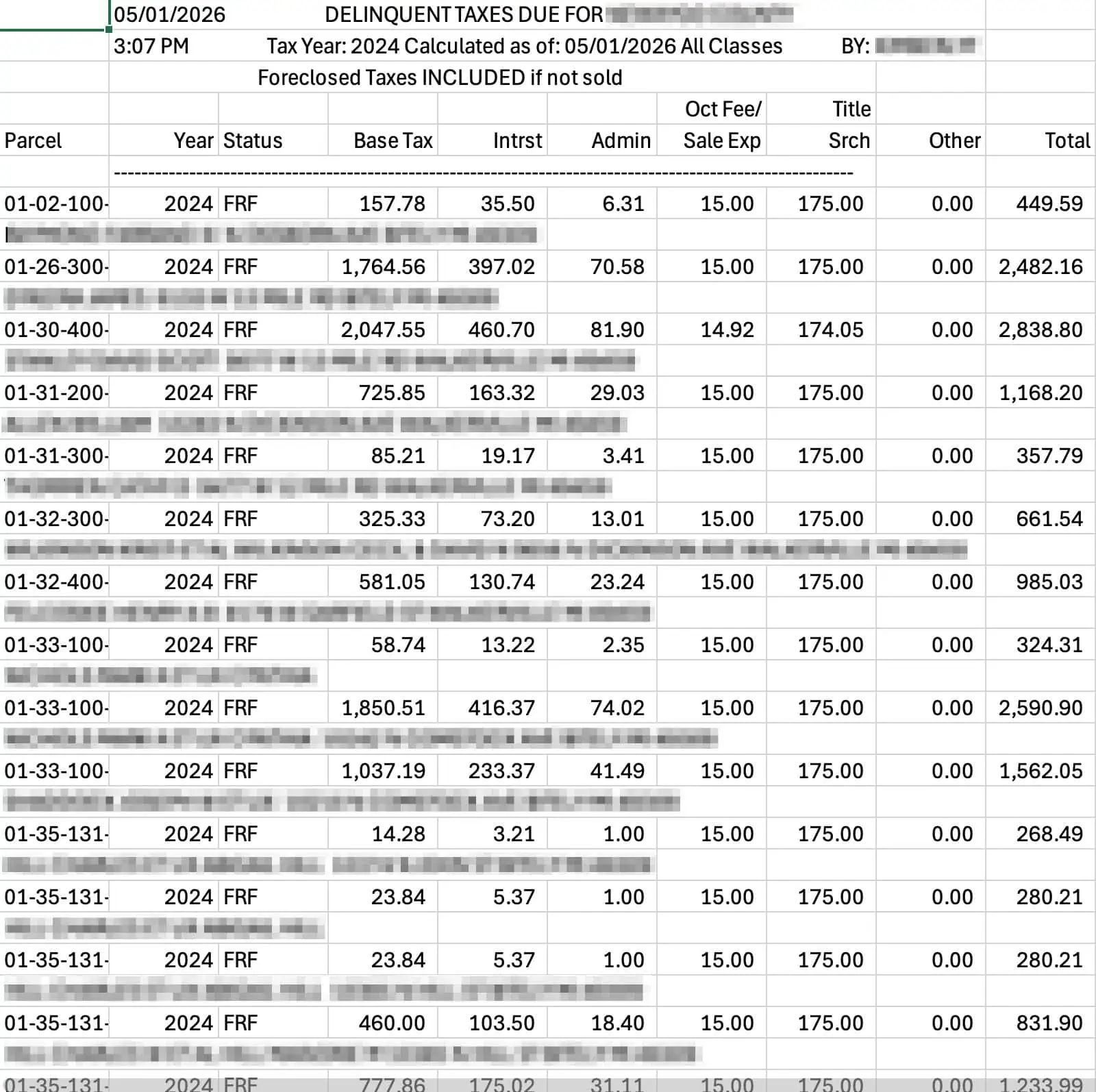
That’s helpful, but it isn’t enough. I’m specifically looking for vacant land in a certain acreage range, sometimes within certain zip codes, and this list tells me none of that.
What I really need to know is how many acres each property is, how it’s zoned, whether it has road access, whether it’s in a wetland or a flood zone, and what it’s worth. Land Portal has all of that.

If I had all the time in the world, I could open Land Portal and look up every property by hand. I don’t have hundreds of hours for that. I need to do it line by line through the API, fast.
Getting Your Land Portal API Key
Inside your Land Portal account, go to Profile, then over to the API section, and click “generate API key.” Give it a name (I named all of mine Claude Cowork), confirm your email and password, and it hands you a long string of letters and numbers.

Treat this key like a password. If someone else got hold of it, they could run up a serious charge on your account, because it’s essentially the keys to everything you do in Land Portal.
In fact, if you try to paste it directly into the chat, Claude will often tell you to delete it and generate a new one. The safer move is to drop the key into a Word document or text file, save it inside a dedicated folder that Claude Cowork can access, and then point Claude to that file so it retrieves the key from your computer instead of from the conversation.
Building the Enrichment Skill
Next I asked Claude Cowork to create a new skill that takes an existing spreadsheet and enriches it with Land Portal data, using the API key from that folder.
What I like about this part is that Claude asks smart clarifying questions before it builds anything. It wanted to know which identifiers my spreadsheets would have for each row, and I told it APN, state, and county. Honestly, that’s the bottom line here. If you have those three things and the APNs are formatted correctly, you can pull almost anything else from Land Portal.
It also asked which fields I wanted added as new columns (I said everything available), how to handle API limits on large jobs (I told it to stop and warn me when it got close), and roughly how big my spreadsheets usually are.
From there I pointed it at my list. You can connect Claude Cowork to your entire Google Drive and hand it a Google Sheet link, which is what I did. If that gives it any trouble, you can simply download the file as a CSV and drop it straight into the chat instead.
Then I sat back and let it work.
The Payoff
About thirty minutes later, it finished a list of roughly 900 records. Let me be clear that thirty minutes is not instant, but it’s a rounding error compared to doing this by hand.
When I opened the result, all my original columns were still there, and a wall of brand-new data scrolled to the right.
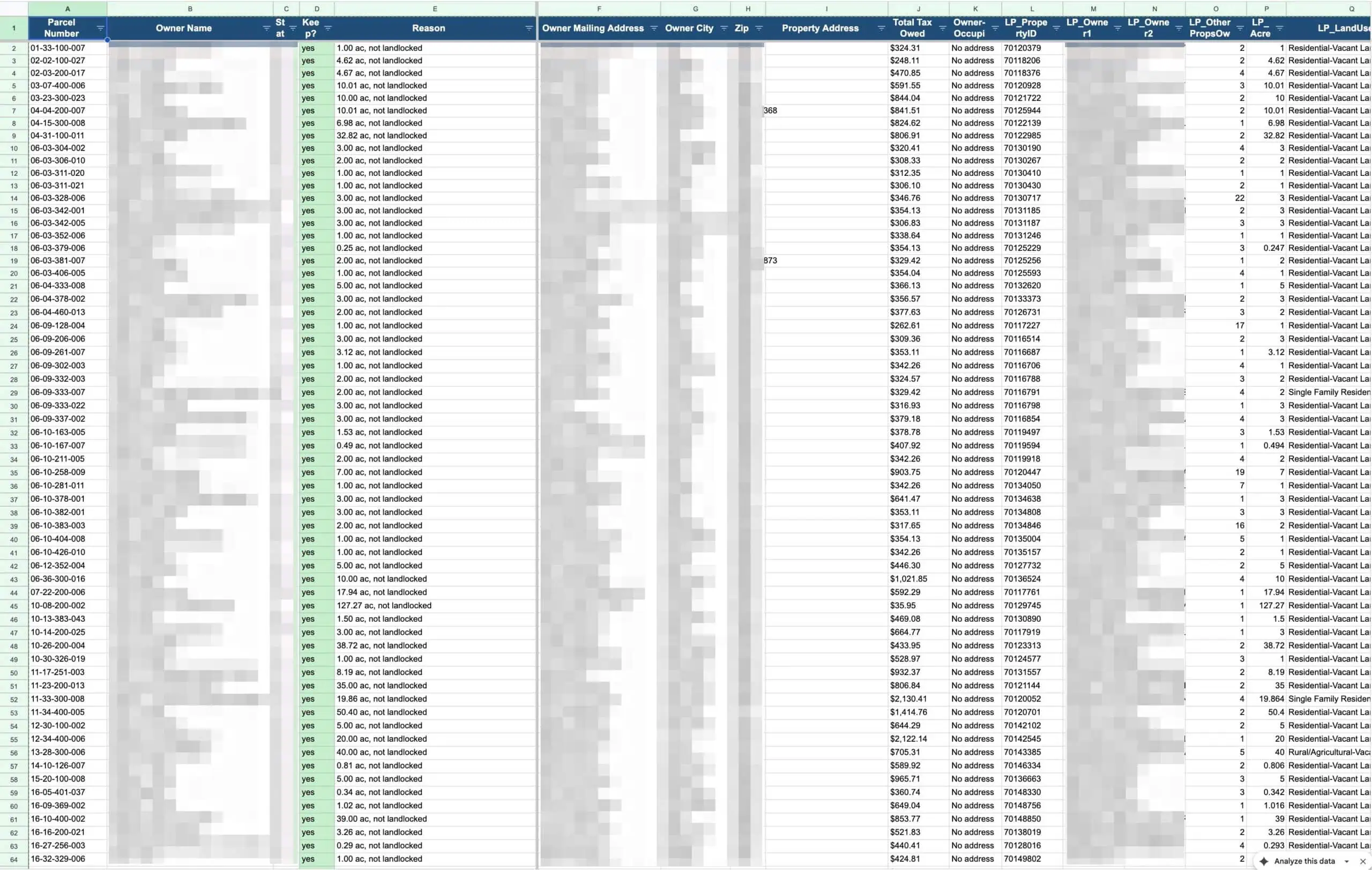
We’re talking acreage, whether the parcel is vacant, the assessed value, the Land Portal estimated value, price per acre, the annual tax amount, whether it’s landlocked, how many feet of road frontage it has, whether it’s in a flood zone and what percentage, whether it touches a wetland and what percentage, a buildability score, the slope report, the school district, and the coordinates.
Now I can do something I couldn’t before. I can filter down to only the properties between 5 and 20 acres and mail just those owners, or send a different message to a different type of owner. The enriched data makes that kind of targeting effortless.
This Isn’t Just for Land Investors
Here’s the part that surprised even me. This exact process isn’t only useful for land investors like me.
The same enrichment workflow can be put to work by realtors, insurance companies, attorneys, surveyors, developers, utility companies, environmental consultants, and even county governments. Anyone sitting on incomplete property data can use it to make smarter decisions.
I genuinely could not have done this without both pieces working together. Land Portal supplies the depth of data, and Claude Cowork does the tedious work of pulling it in at scale.
If you’re spending hours staring at half-empty spreadsheets, this is worth a look. Grab Claude Cowork and check out Land Portal, connect the two, and let them turn your bad property lists into something you can actually act on.